
Guide · Getting started
Guide · 01
Getting started
Political Eye puts every precinct, official, polling place and station on one 3D globe, from public records. This guide shows you how to use it.
What Political Eye is
Political Eye runs on GeoPolitical Earth, a 3D globe. You can drill down from the whole United States to a state, then a county, a precinct and a single pin. At each step the globe shows the public numbers for that place:
- The nation: 2024 presidential results for all 50 states and DC, and for 3,144 counties.
- Texas: all 9,712 precincts, with the 2024 result, lean, turnout and Spanish-surname share.
- County editions: full detail for Collin County (273 precincts, 90 vote centres, 190 chairs, 56 races) and Dallas County (791 precincts, 443 vote centres, 211 chairs, 121 races).
- Pins: vote centres, party events and clubs, district labels, and 17,522 radio and TV stations, each linked to its FCC political file.
Getting access
Public access is free. The app is at geopoliticalearth.com/politicaleye; sign in with your Google account and the globe opens at once with every public layer: national and Texas results down to the precinct, vote centres, stations, district lines, the Political Academy and the Chairman's map demo. There is no waiting list and nothing to approve.
The paid layers (precinct chairs, demographics, races) and the ways to work with us are requested from the same page, under Request more access:
- Full access: request the paid layers. Online subscriptions open soon; until then Ben sets you up by hand.
- Sponsors: put your place on the map as a sponsored card.
- Investors: talk to us about investing with a short note. Ben replies personally.
- Team: enter your invite code.
- Donors: support the build with any amount from $5. It is a contribution to a private, for-profit project: not tax-deductible, not a political contribution, and it buys no equity or return.
- Already signed in? Log in and the globe opens.
Questions? Email us.
A modern desktop browser (Chrome, Edge, Firefox or Safari) works best. The globe also runs on recent phones and tablets.
The start screen
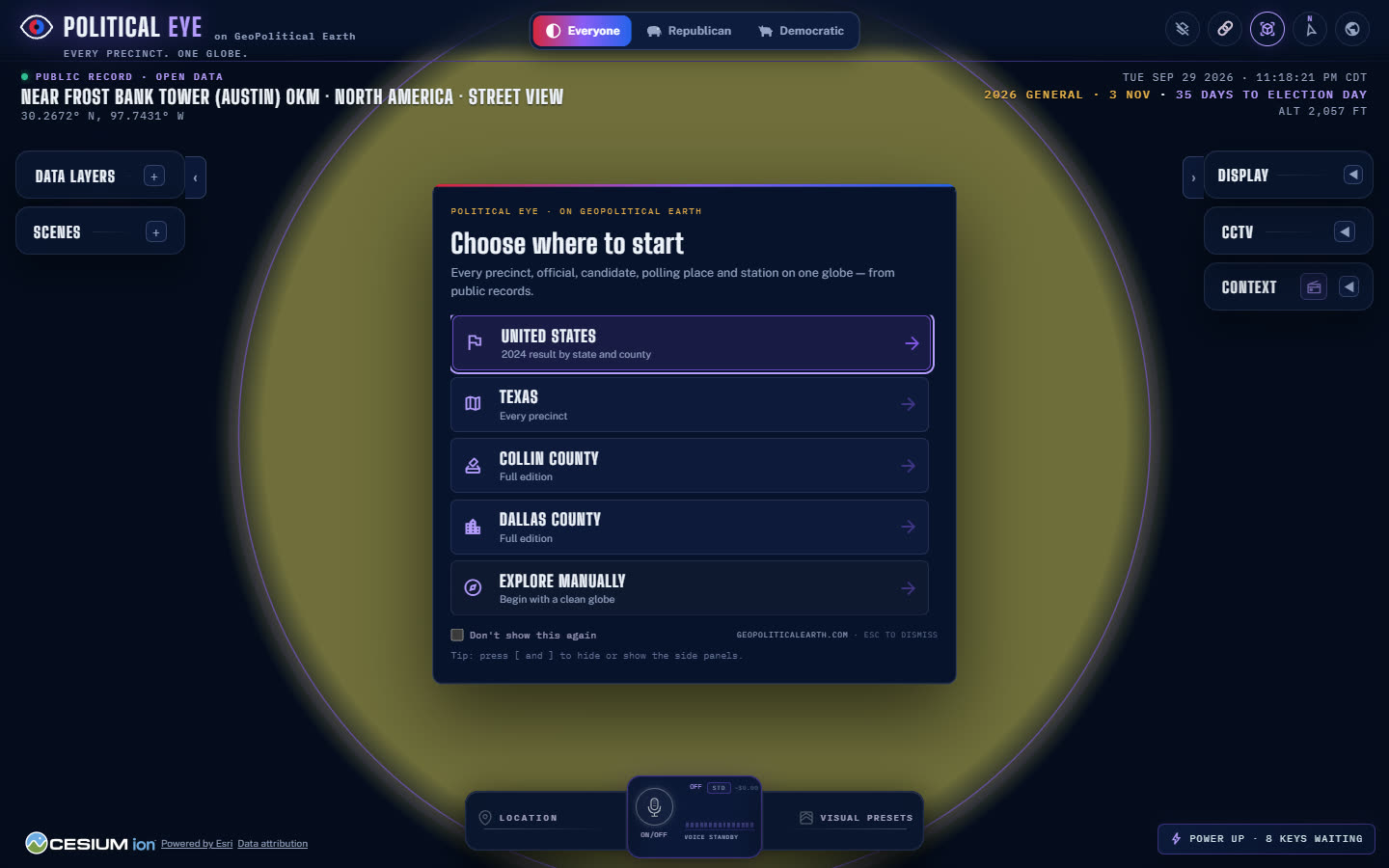
The first time you open the app it asks Choose where to start:
| Choice | What it turns on |
|---|---|
| United States | States and counties, coloured by the 2024 result; the camera flies to the lower 48. |
| Texas | The above, plus every Texas precinct and the Texas state card. |
| Collin County | The full Collin edition: precincts, vote centres, chairs and events, with the county card. |
| Dallas County | The full Dallas edition, the same way. |
| Explore manually | A clean globe. Nothing is switched on and the camera stays where it is. |
Tick Don't show this again to skip the screen next time, or press Esc to close it.
Finding your way around the screen
- Top centre: the party switch, with Everyone, Republican and Democratic. See Party views.
- Top left: the brand, then the place readout. It shows
PUBLIC RECORD · OPEN DATA, the place you're looking at, and the latitude and longitude. - Top right: the local date and time, the countdown to Election Day (3 November 2026) and your altitude.
- Left rail: Data Layers and Scenes. Press [ to hide or show it.
- Right rail: Display and the other panels. Press ] to hide or show it.
- Bottom: the dock, with Location, the voice button for Ruby, and Visual Presets. The credit line with Data attribution is bottom left.
Your first five minutes
- Choose United States. Hover over a state to see its margin, then click it.
- On the state card, choose Collin County or Dallas County under County editions.
- Click any precinct. Its card shows the result, primary voters, demographics, the chair, its districts and the races on its ballot.
- Switch the view at the top between Everyone, Republican and Democratic.
- Scroll in on a vote centre until you reach street level. Hold the right mouse button and drag to tilt into 3D.